Think 360 Studio

Design, collaborate & launch with AI

Work effectively with cross-functional teams — and use AI as your co-pilot to design, build, and launch better products.

Prince Pal
Prince Pal
Agenda

The next 60 minutes

00:00IntroductionMy journey, why collaboration matters, and how AI is changing the work.
06:00Product & engineeringGoals, requirements, handoffs, trade-offs, and AI prototyping.
20:00Working with designersFeedback, design systems, critiques, remote teams, and the shift in product design.
34:00Launching productsMoSCoW, idea to launch, MLP thinking, release, and measuring success.
50:00Q&A + resourcesMy AI-powered workflow, process, and the toolkit I rely on.
Prince Pal · UX Expert
Section 01 / 05

Introduction

Why collaboration and AI now define how great products get built.

Prince Pal
Hello, I’m Prince

18+ years building products people actually use

Great products are never built by designers alone — they are built through collaboration between design, product, and engineering.

Healthcare SaaS FinTech Logistics AI
18+years designing digital products
5industries
60M+users reached

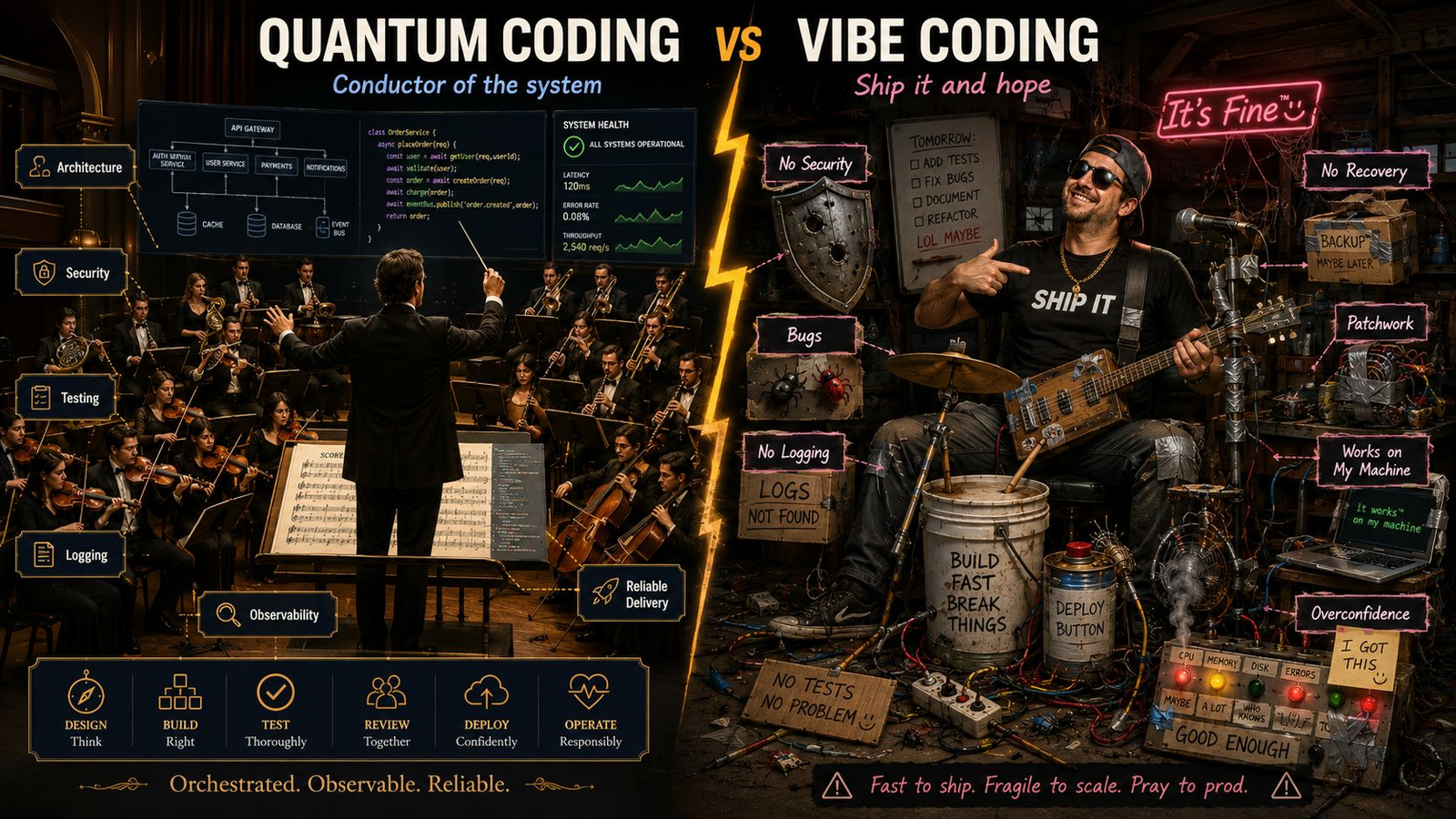
Vibe coding is dead.

Quantum thinking is the future.
Prince Pal · UX Expert
Quantum coding vs vibe coding illustration
Why now

Two forces are reshaping how we build

Collaboration
Matters more than ever
— Products are more complex than ever — Design, product & engineering align early — The best teams decide together, not in silos
Artificial intelligence
Changing how we build
— Research & docs in minutes, not hours — A daily collaborator for thinking through problems — Not a replacement — a companion for the work
Prince Pal · UX Expert
Section 02 / 05

Working with product & engineering

Aligning user needs, business goals, and technical reality from day one.

Team working together at desks
Strategic product design

Every decision answers four questions

01Does it solve a user problem?
02Does it support business goals?
03Is it technically feasible?
04What does AI need to know?

Humans provide what AI can’t: context, empathy, ethics, taste, strategy.
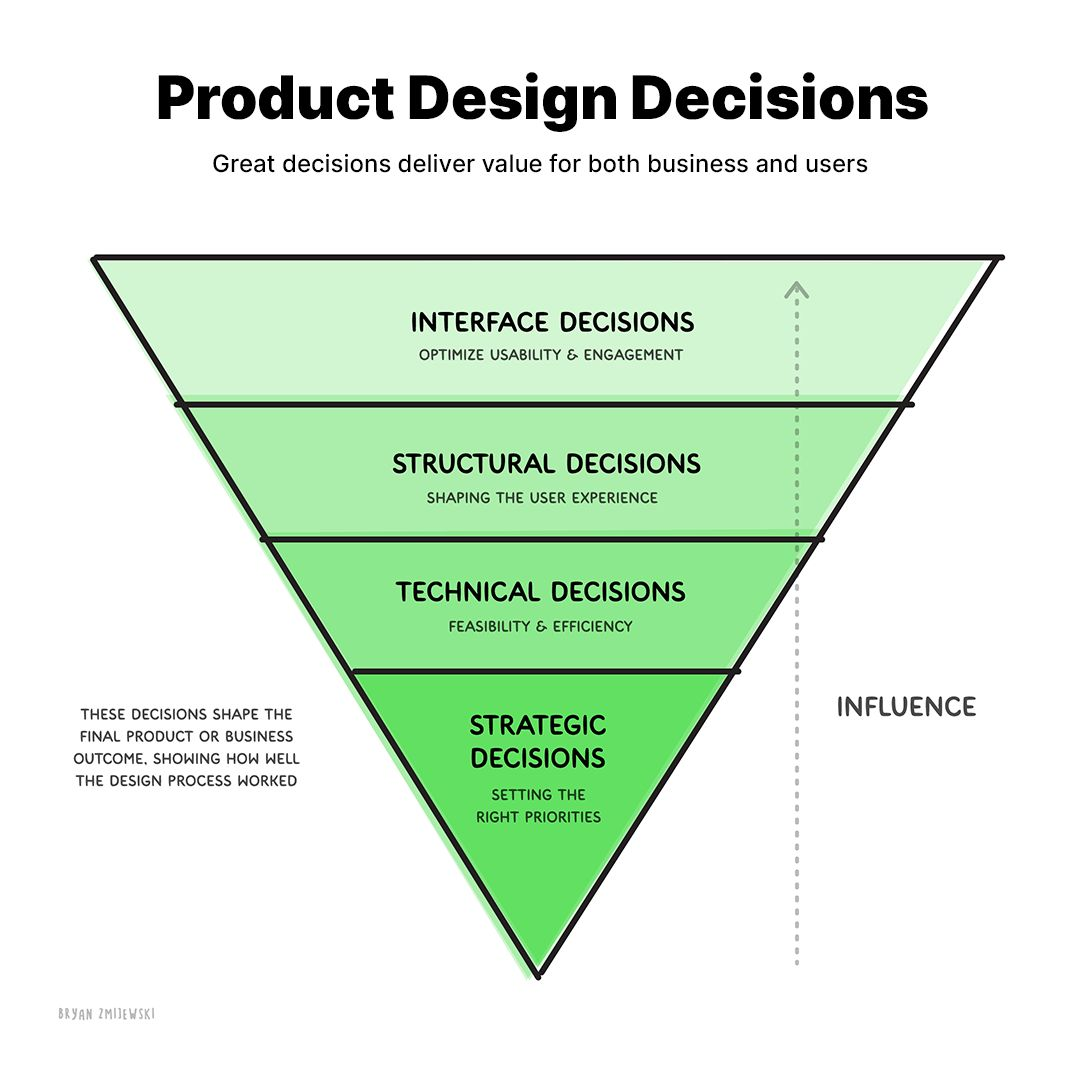
Product design decisions pyramid
Prince Pal · UX Expert
Working together

Practices that reduce friction

RequirementsWrite it down clearlyUser stories, acceptance criteria, and edge cases cut the back-and-forth.
HandoffsCommunicate intentShare interactions and assumptions — not just a set of Figma screens.
Trade-offsMake them explicitSpeed vs quality. Business vs user. Feasibility vs the ideal experience.
Prince Pal · UX Expert
Speed vs quality · Business vs user

Case study: Twitter → X

Business goals A platform beyond tweets New subscription revenue Lower operating costs Move faster, fewer constraints
User impact ~Half of 7,500 staff cut — some rehired A 15+ year brand identity lost Verification became paid Rapid changes confused users
The product lesson Business vision gives direction. User trust creates adoption. In the AI era, speed is getting easier. Judgment is the real advantage.
BeforeIdea → Design → Review → Build → Ship AI eraIdea → Ship → Break → Fix → Repeat
Prince Pal · UX Expert
How I use AI

My product & engineering co-pilot

01
Generate PRDs & user storiesAcceptance criteria and scope — ChatGPT
02
Analyze requirements & edge casesPressure-test decisions — Claude
03
Summarize meetings into actionsNotes to next steps, instantly
04
Draft stakeholder updatesClear communication in seconds
ChatGPT + Claude · PRD
YOUDraft a PRD and user stories for in-app notifications. Include acceptance criteria and edge cases.
ASSISTANTPRD drafted with goals, scope, and 6 user stories. Flagged 4 edge cases — offline delivery, rate limits, permission revocation, and duplicates.
Ask a follow-up…
Prince Pal · UX Expert
UX research

Why UX research matters more in the AI era

Ideas are abundant. Execution is faster than ever. The differentiator is understanding people, solving meaningful problems, and making better decisions.

In a world where everyone can build, the winners will know what is worth building.
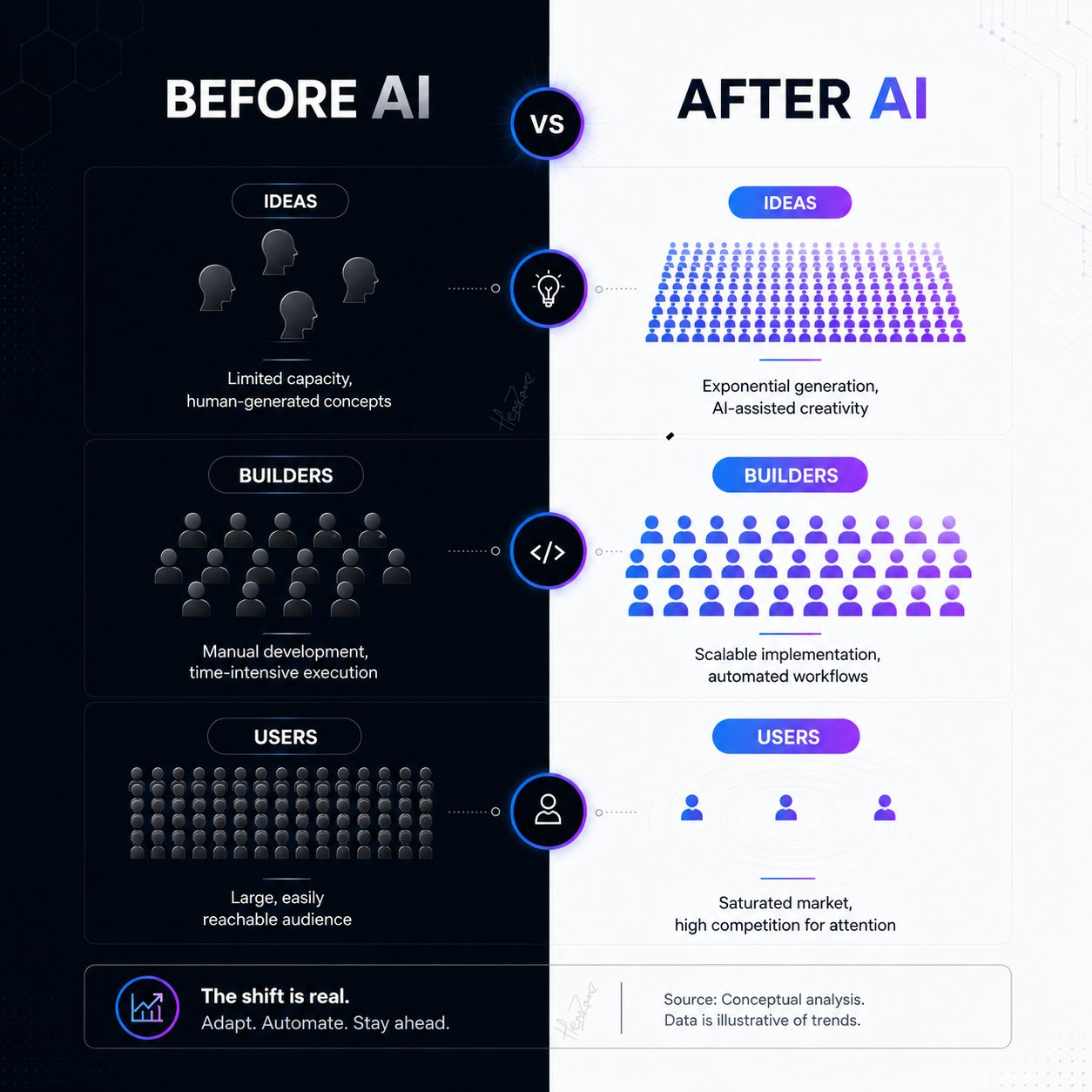
Before AI vs after AI
Prince Pal · UX Expert
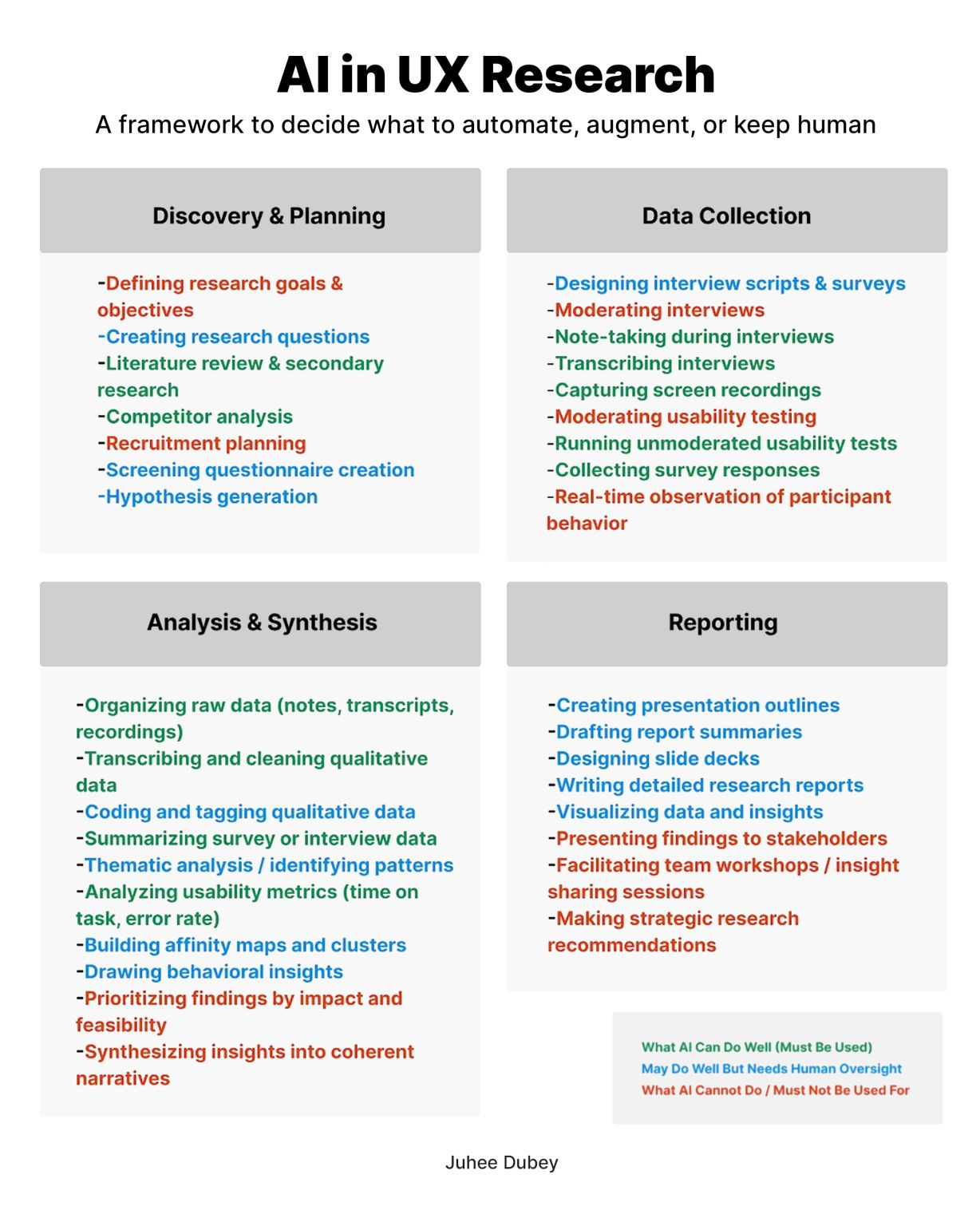
AI in UX research

Automate, augment, or keep human

AutomateRepetitive & slow
Transcribing interviews, tagging raw data, summarizing surveys, first-pass affinity maps.
AugmentAI assists, human decides
Drafting interview scripts, surfacing patterns across sessions, proposing hypotheses to test.
Human onlyEmpathy, context & ethics
Moderating sessions, reading emotion, consent, prioritizing by impact, deciding what is worth building.
AI in UX research framework
Prince Pal · UX Expert
The future of UX

Standardization + personalization

01Universal accessibilityOne experience, personalized for every human.
02Standard smart controlsStop reinventing forms.
03Consistent patternsLearn once. Use everywhere.
04Personal preferencesThe web adapts to you.
05Human + AI OSInterfaces become intelligent.

The future of UX is fewer interfaces to learn.

Prince Pal · UX Expert
Design shift in an AI world

The shift in product design

From big upfront bets to continuous, data-informed decisions. The bottleneck is no longer building — it’s deciding well together.
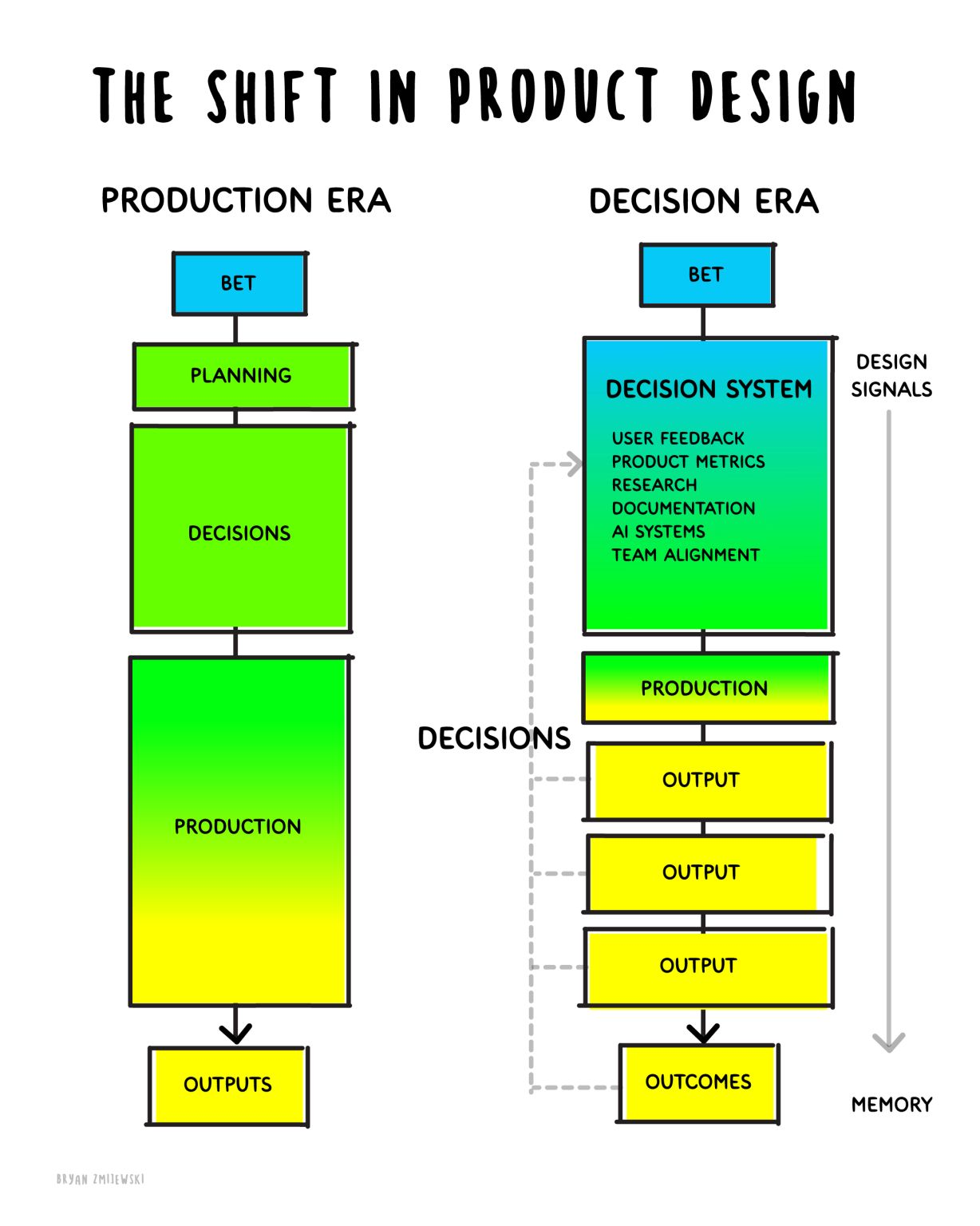
— Documentation matters more than ever — Vibe coding isn’t the answer — Continuous collaboration beats meetings — Learning requires strong memory — Judgment is now a team sport
The shift in product design: production era vs decision era
Prince Pal · UX Expert
Case study

When vibe coding creates rework

Wrong starting pointPulled from the wrong branchDocumentation must remove ambiguity before coding starts.
Prompted, then trustedAI output checked in untestedAI can generate code. Engineers still own verification.
Invented the productFunctionality changed without agreementSuggestions are welcome. Unapproved scope creates rework.
The real costFast output became slower deliveryRounds of correction, lost review time, retesting, reduced confidence.

Quantum coding: document intent, validate assumptions, test the result, preserve the system.

Prince Pal · UX Expert
Design shift in an AI world

The evolution of UX thinking

1990sMake it workCan the user complete the task?
2000sMake it usableCan people understand how to use it?
2010sMake it responsiveDoes it stay consistent everywhere?
2020sMake it frictionlessHow fast can we ship a polished experience?
NowMake it meaningfulIs this the right thing to build?

From screen designer to decision architect.

Prince Pal · UX Expert

The best AI systems don’t start with better prompts. They start with better inputs.

Prince Pal · UX Expert
Design shift in an AI world

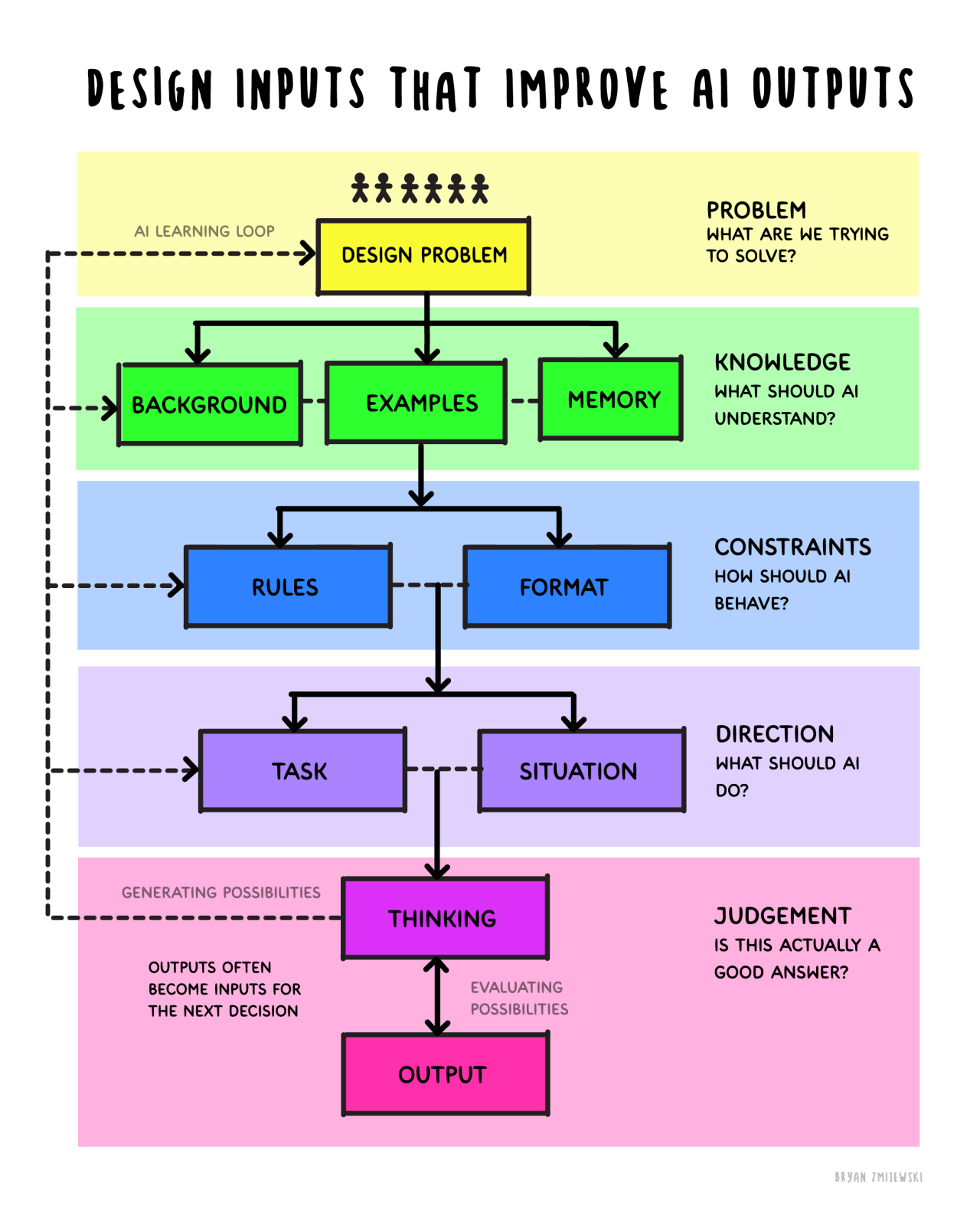
Design inputs that improve AI outputs

ProblemWhat are we trying to solve?
KnowledgeWhat should AI know?
ConstraintsWhat rules should AI follow?
DirectionWhat exactly do we want AI to do?
JudgmentIs this actually a good answer?
Design inputs that improve AI outputs diagram
Prince Pal · UX Expert
Section 03 / 05

Working with designers

How designers make each other — and the product — better.
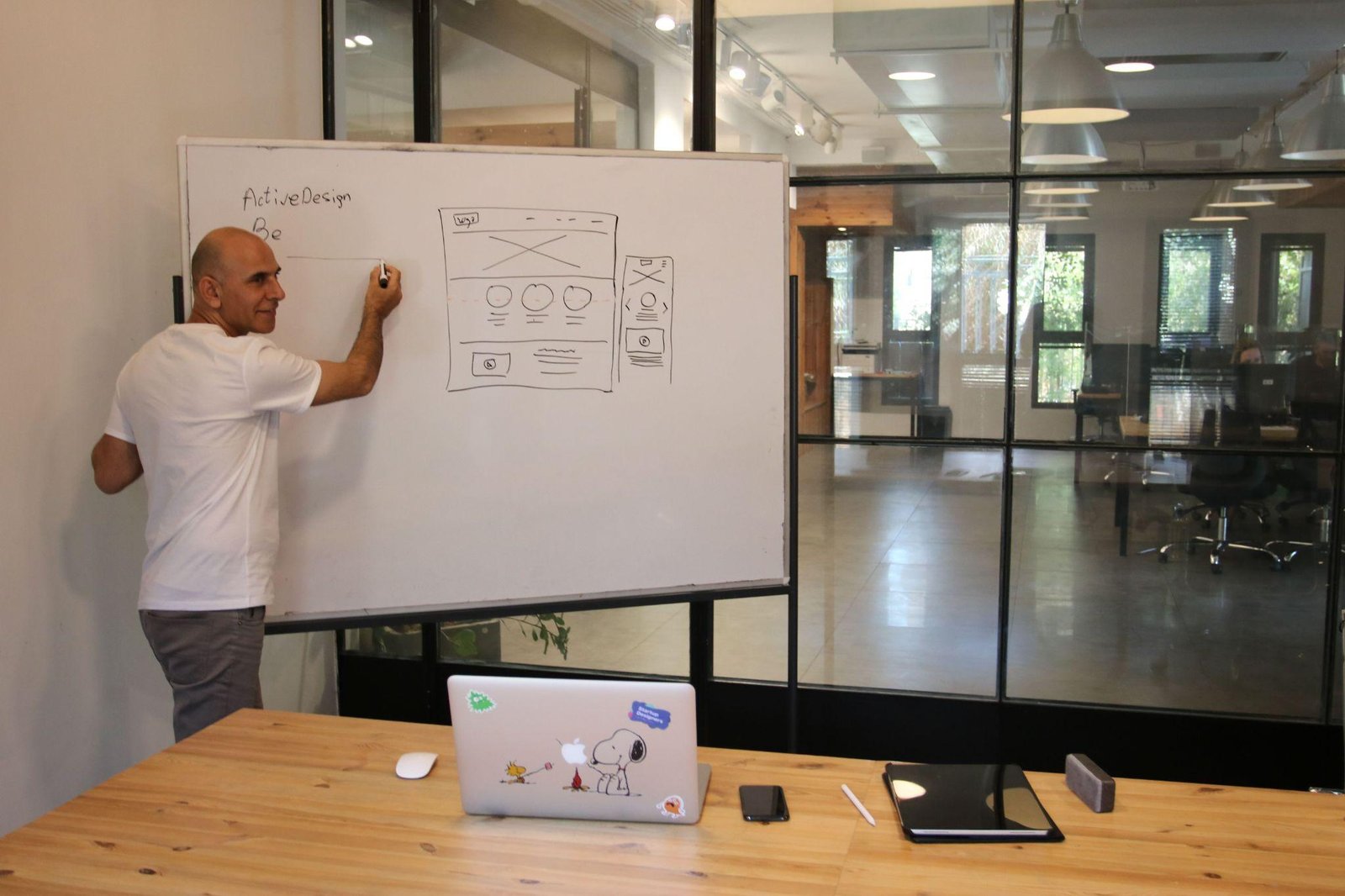
Designer sketching on a whiteboard
Working with designers

How designers make each other better

FeedbackAbout outcomes, not preferencesAsk better questions; receive critique without becoming defensive.
Design systems + brandingA shared languageScale faster and reduce design debt across design and engineering.
CritiquesDecisions, not opinionsPresent clearly and defend with evidence, not personal taste.
RemoteAsync by defaultClear documentation across time zones and cultures.
Prince Pal · UX Expert
How I use AI

In my design process

01
Generate UX copy & content ideasOnboarding, empty states, micro-interactions
02
Explore alternative conceptsMultiple directions before committing
03
Review accessibility & usabilitySurface friction points and edge cases
04
Speed up research & explorationSummarize, analyze, and compare faster
Design exploration · UX copy
YOUGive me 5 empty-state copy options for a first-time analytics dashboard.
ASSISTANT5 variations — from concise to encouraging. Each pairs a one-line value prompt with a clear primary action.
Refine tone or length…
Prince Pal · UX Expert
Strategic product design

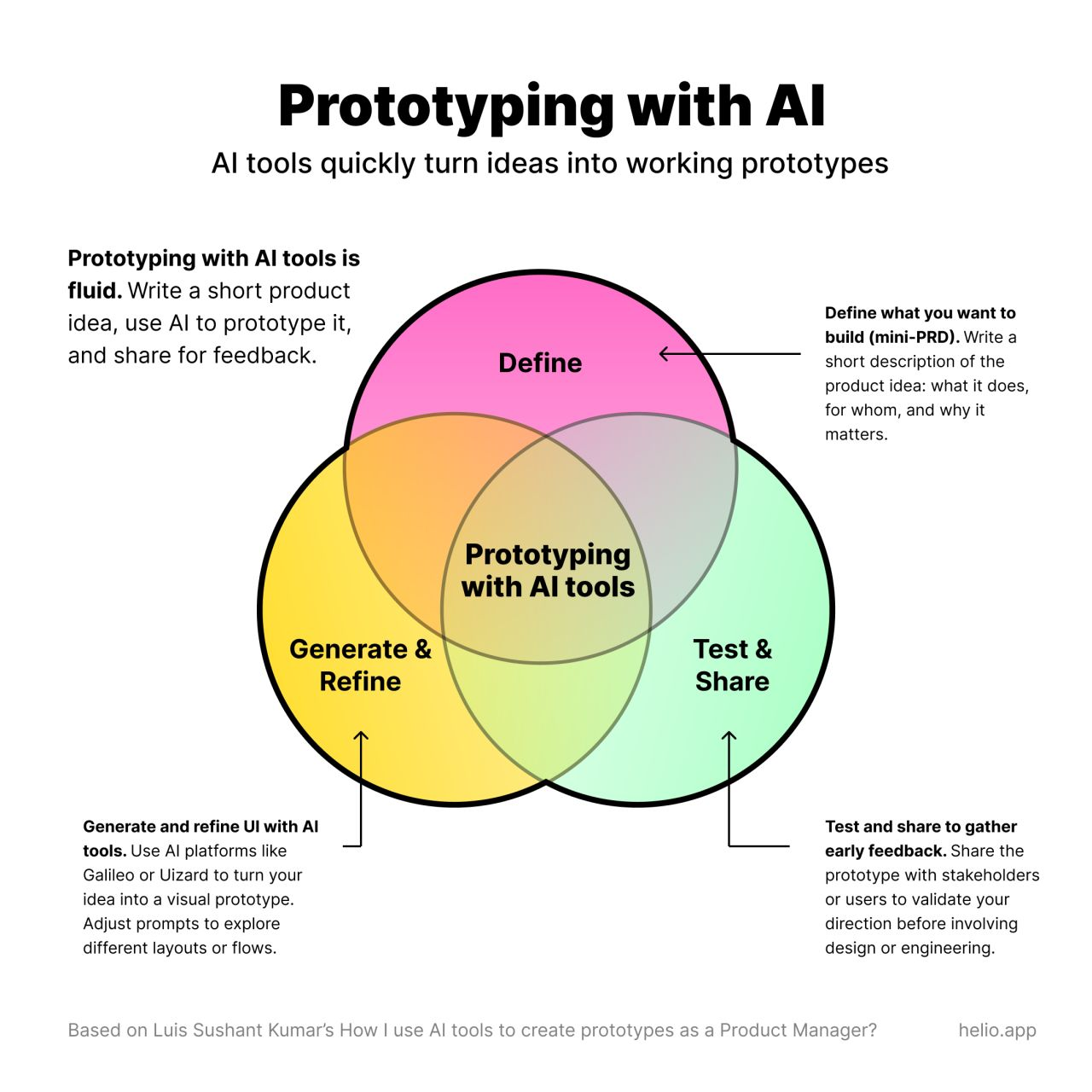
Prototyping with AI, fluidly

1
Define what you’re buildingA mini-PRD: what it does, for whom, and why it matters.
2
Generate & refine UITurn the idea into a prototype; adjust prompts to explore flows.
3
Test & shareValidate direction with stakeholders before involving design or engineering.
Prototyping with AI Venn diagram
Prince Pal · UX Expert
Section 04 / 05

Launching products & features

From a validated idea to a confident release — then learning from real users.
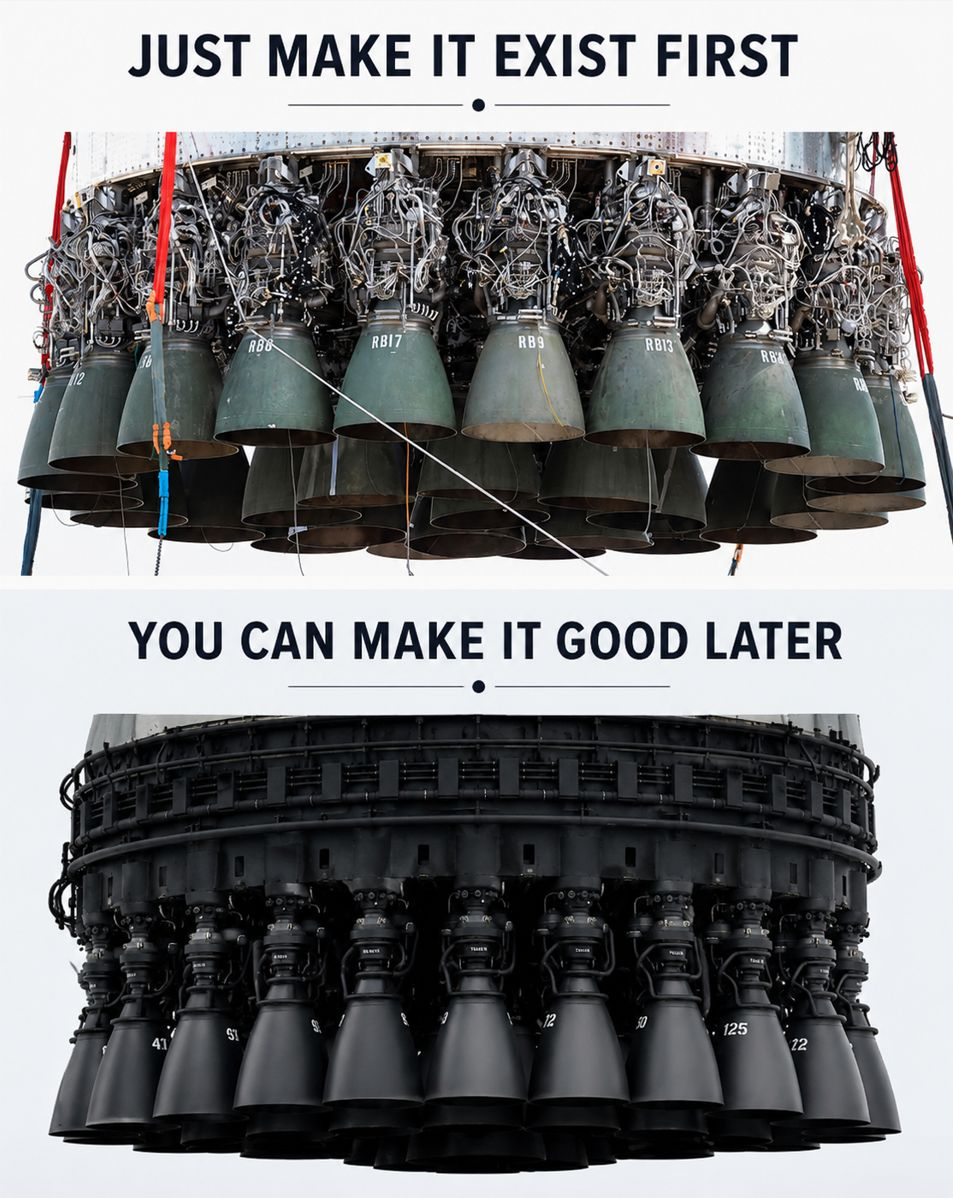
Just make it exist first. You can make it good later.
From idea to launch

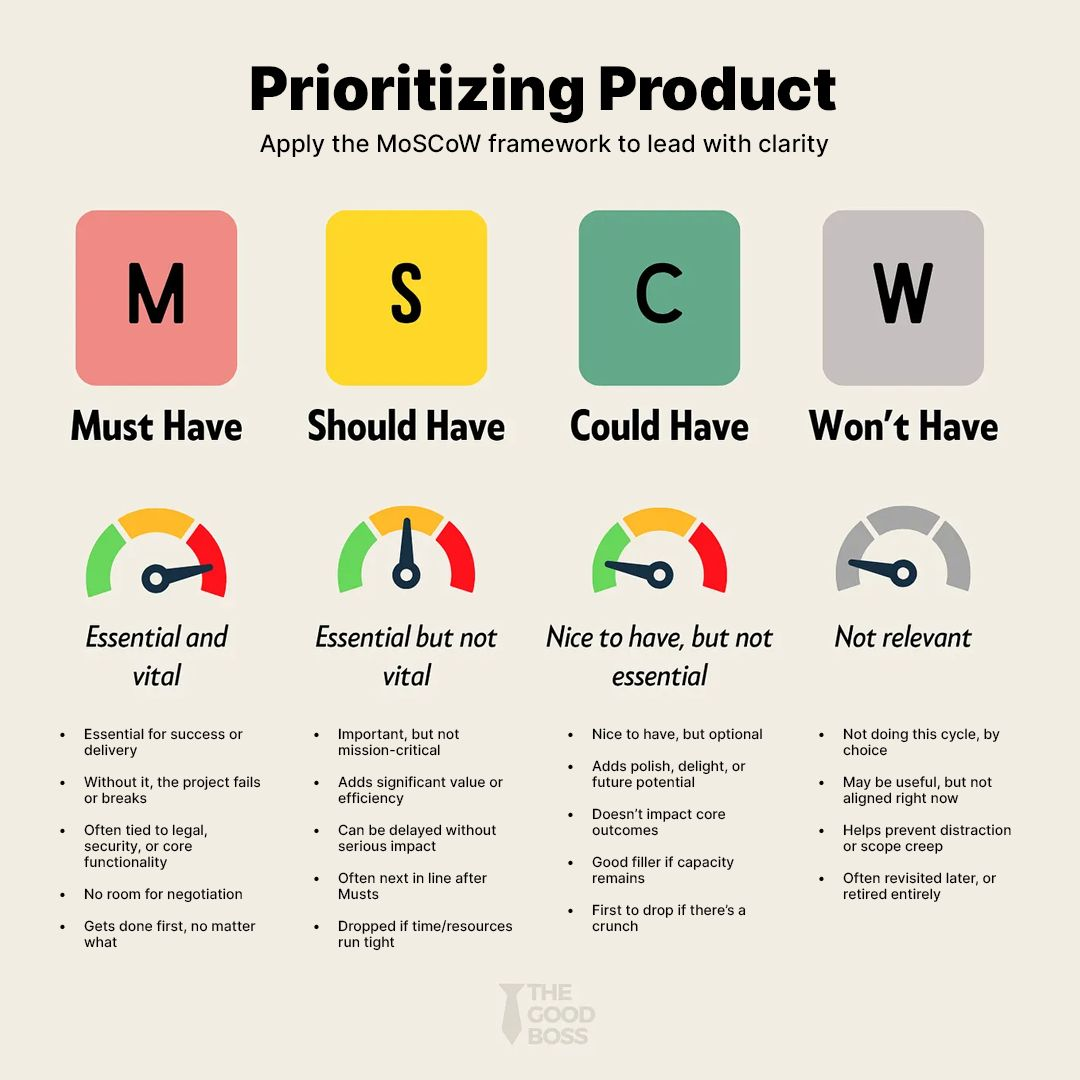
Prioritizing product features

Must haveCritical. Without it, the plan fails.
Should haveImportant but not vital.
Could haveNice to include if there’s time or budget.
Won’t haveNot a focus this time around.
MoSCoW prioritization chart
Prince Pal · UX Expert
Before a single screen

From idea to a validated concept

Discovery, research, and early prototypes align user needs, business goals, and feasibility — long before development begins.

01Who are we building for?
02What problem are we solving?
03Why does this problem matter?
04How will we know we’ve solved it?
Prince Pal · UX Expert
Prioritization

MLP thinking: deciding what not to build

A Minimum Lovable Product is the smallest solution that validates your assumptions and creates real value for users.

Viable asksDoes it function?
Lovable asksWould anyone miss it?
Identify the core value proposition
Prioritize features by impact vs effort
Build the smallest version that validates
Avoid feature creep and over-engineering
Prince Pal · UX Expert
From idea to launch

Strategic technical planning

01Plan for reworkAssume the first solution will teach you something. Reserve capacity for iteration.
02Refactor intentionallyImprove the structure while preserving behavior. Reduce debt before adding complexity.
03Group by capabilityTreat related bugs and enhancements as one redesign. Fix the workflow, not symptoms.
04Version without disruptionLet V1 and V2 coexist. Support gradual migration; retire the old after validation.

Build for the next version — not just the next release.

Prince Pal · UX Expert
Cinemachina in practice

From dialogue-first to a new standard

01 · Version 1Dialogue-first workflowEvery frame generated from a dialogue line.
02 · New capabilityStoryboard-first visionA pen-and-paper sketch reimagined the workflow around scenes, not lines.
Dialogue-first→ Storyboard-first→ Music video mode→ New standard for movies & trailers
Prince Pal · UX Expert
From idea to launch

From mockup to working foundation

Old model Designer creates mockups Static screens, interaction notes, Figma handoff. The developer interprets the design and translates intent into code.
New model Designer ships a working front end The developer builds from functioning code — connecting APIs, business rules, auth, and production architecture.

Design handoff is becoming code handoff.

Prince Pal · UX Expert
Shipping

Prepare for release, then measure what matters

Prepare for release — Readiness checklists & design/dev QA — User onboarding & education — Internal alignment & rollout plan — Risk mitigation before launch
Measure success — Define success metrics before launch — Track adoption & engagement — Qualitative + quantitative feedback — Retention & business impact
Prince Pal · UX Expert
How I use AI

A thought partner across the launch

01
Launch checklists & QA scenariosCatch what teams overlook
02
User flows & onboarding ideasBrainstorm journeys before building
03
Release notes & marketing copyAnnouncements, docs, and emails
04
Identify risks before shippingA thought partner for blind spots
Claude · pre-launch review · risks
YOUWhat could go wrong with this feature? List the missing scenarios and edge cases.
ASSISTANT12 risks across data migration, permission states, rollback path, and notification spam. Suggested 3 pre-launch checks.
Dig into a risk…
Prince Pal · UX Expert
Shipping

Evaluating user needs and business goals with UX metrics

UX metrics connect user needs to business goals — especially as AI and automation change how people interact with products.

They give clear signals into behavior, so teams make better decisions and improve experiences.
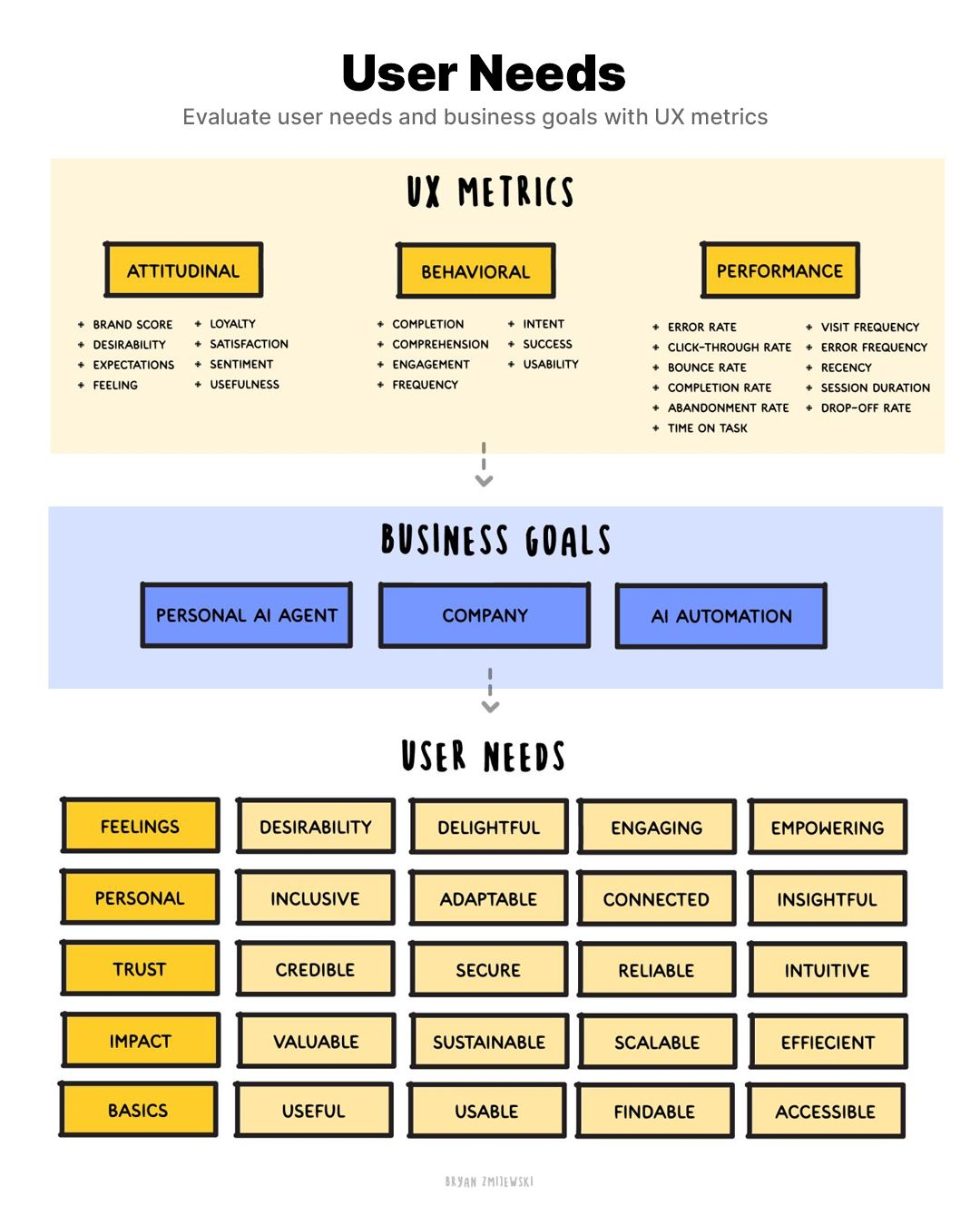
User needs, UX metrics and business goals diagram
Prince Pal · UX Expert
Shipping

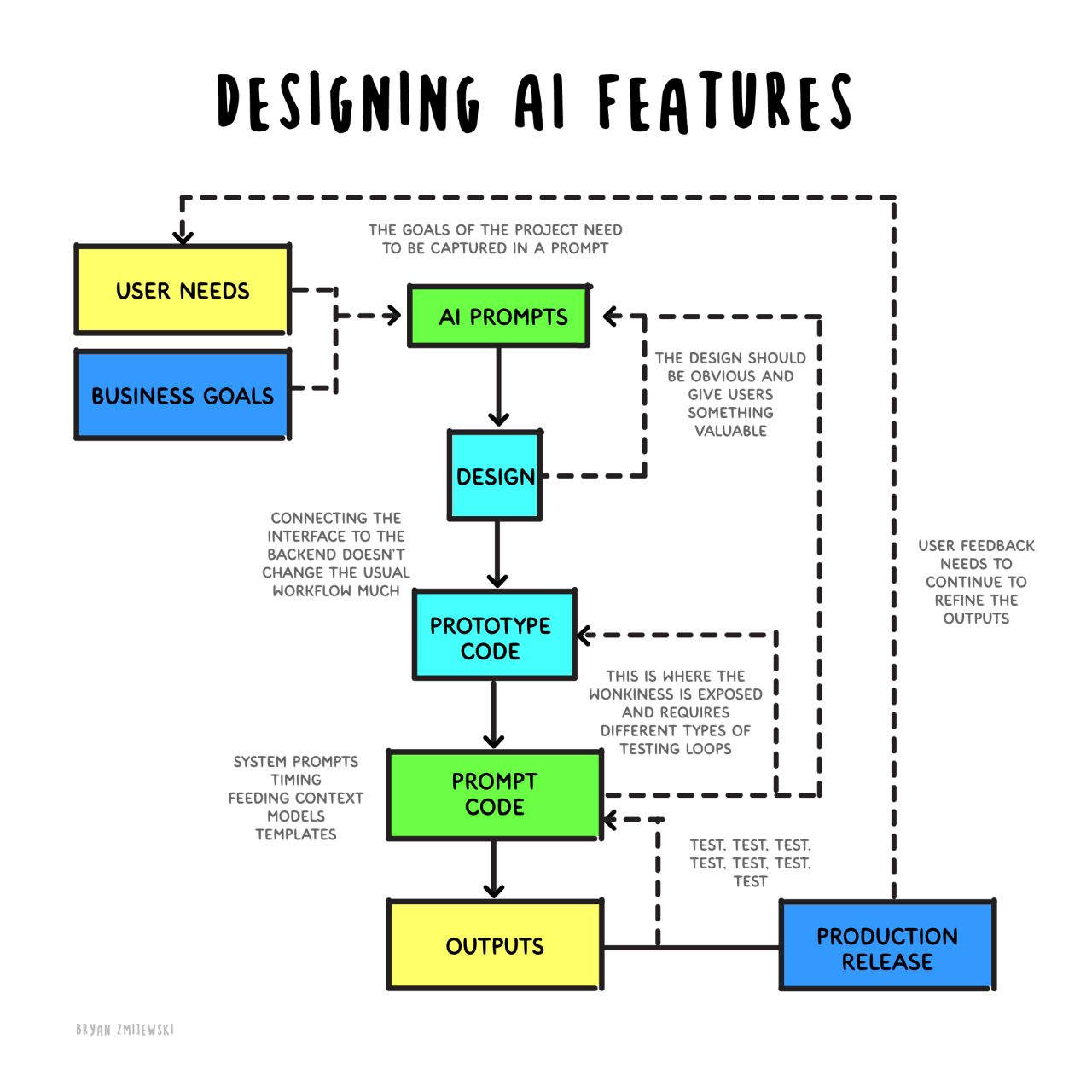
Designing with AI

Designing with AI isn’t about polishing pixels faster. It’s about building resilience into systems that will always keep shifting.
Usability
Usefulness
Enjoyment
Designing AI features flow diagram
Prince Pal · UX Expert
Section 05 / 05

Q&A + resources

My AI-powered workflow, the toolkit I rely on, and your questions.

Question mark on crumpled paper
The workflow

My AI-powered product workflow

01Discovery & researchCompetitors, insights, opportunities
02Strategy & docsPRDs, user stories, agendas
03Design explorationIdeas, UX copy, user flows
04CollaborationSummaries, updates, decks
05Launch & iterationChecklists, QA, feedback
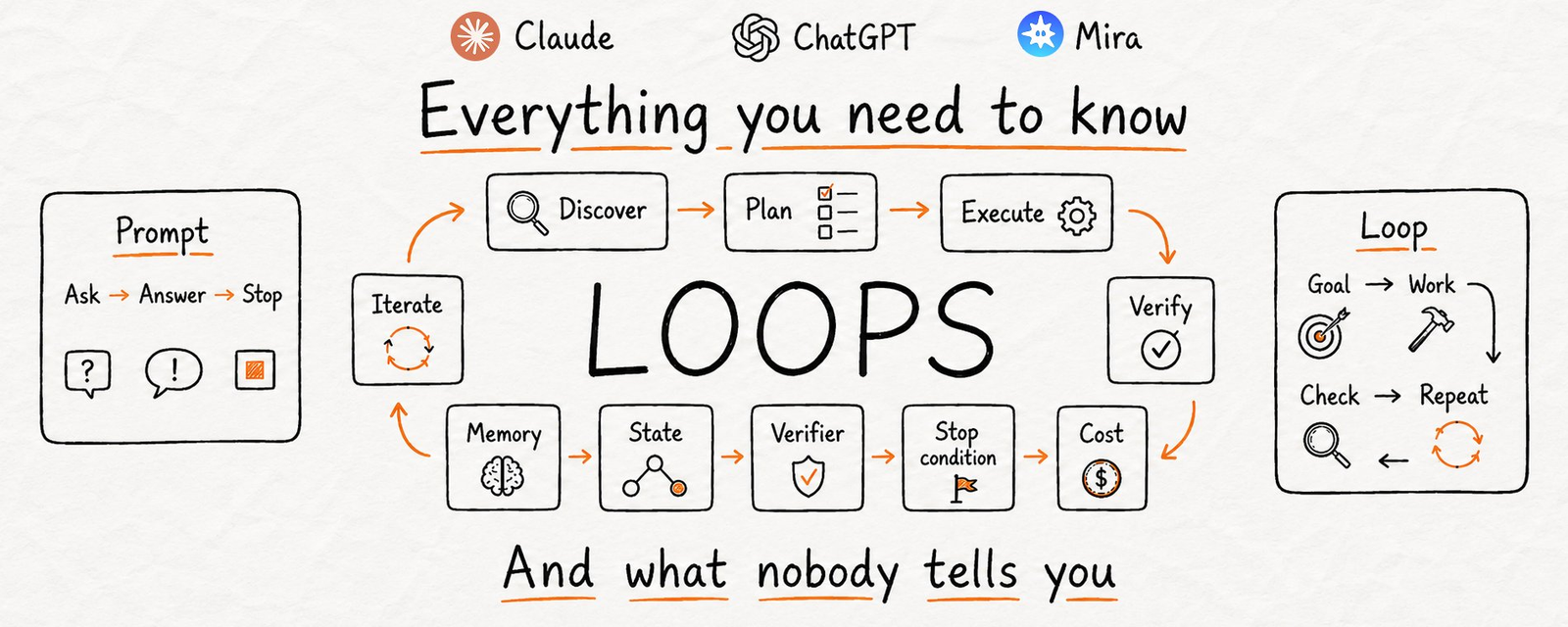
Loops: everything you need to know
Prince Pal · UX Expert
The workflow

Today’s design process in the AI era

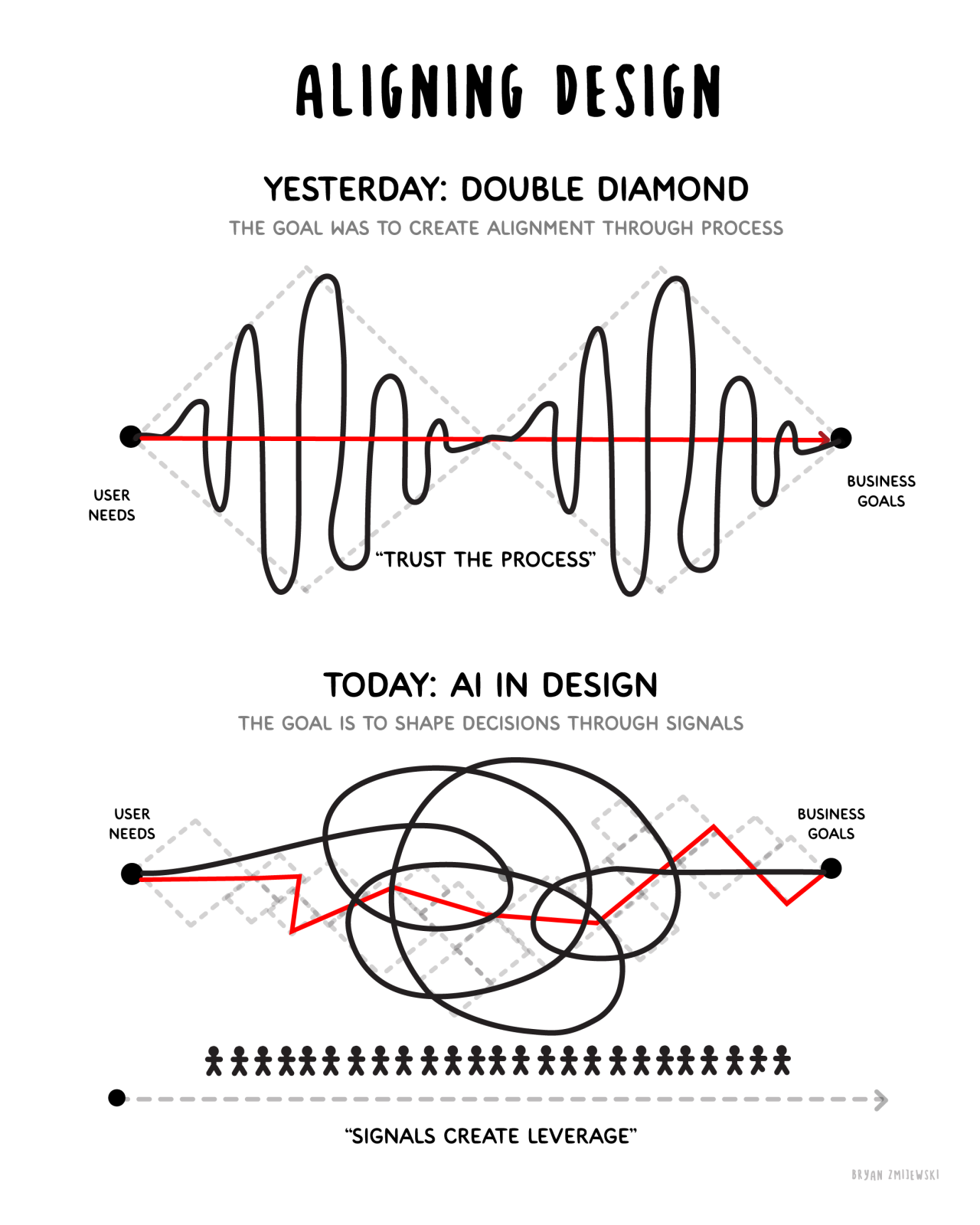
The double diamond lets process drive the work. I’m proposing signals drive it instead — reframing problems bit by bit with solid input data.

Each step surfaces one problem before the next begins, so trust compounds instead of being asked for up front.

We built Glare for this: a decision system.
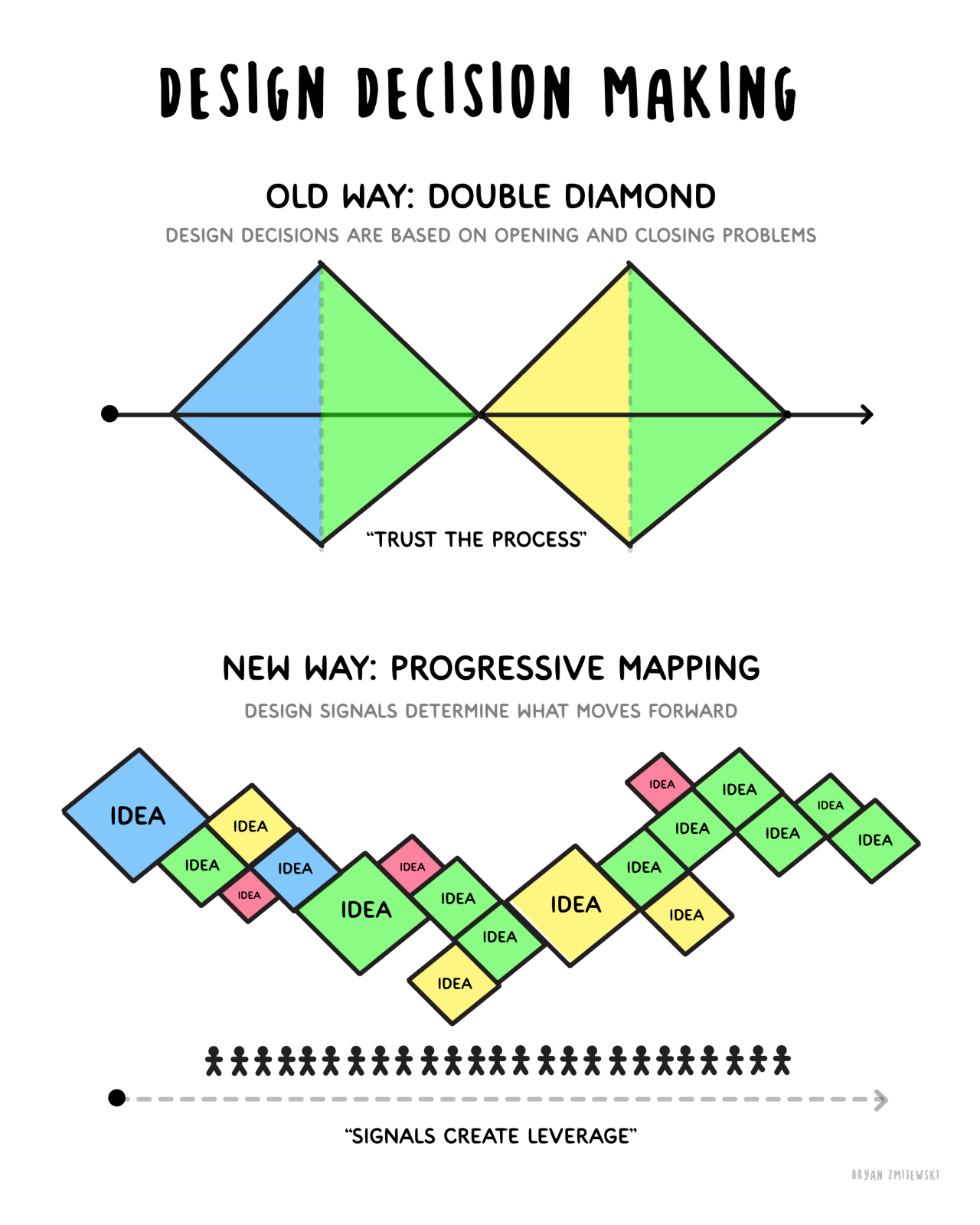
Design decision making: old vs new Aligning design: double diamond vs today
Prince Pal · UX Expert
Resources

The toolkit I rely on

ChatGPT logoChatGPTStrategy & commsPRDs, brainstorming, summaries, and UX copy.

Claude logoClaudeDeep analysisRequirements, edge cases, long documents, and coding.
Claude logoClaude DesignDesign speedConcepts, mock data, and rapid prototyping.

Notion logoNotion AIKnowledgeResearch, notes, and project plans.

Framer logoFramer AIInteractiveLanding pages and quick prototypes.
Prince Pal · UX Expert
From the book

Quantum thinking: seven principles

Every decision is a node in a connected system. Quantum thinking is deciding with the whole system in view.

01Systems, not screens
02Decisions, not deliverables
03Signals, not assumptions
04Probabilities, not certainty
05Loops, not phases
06Consequences, not features
07Think with AI, not through AI
Prince Pal · UX Expert
From the book

The judgment stack

01FrameWhat problem, in the user’s words?
02ContextWhat do we — and the system — know?
03EvidenceWhy do we believe it, and how strongly?
04ConstraintsWhat cannot change this time?
05OptionsReal alternatives, including nothing
06Trade-offsWhat we give up, and who feels it
07RiskWhat could go wrong; how we’d know
08DecisionWhat we choose, and who owns it
09MeasurementHow we’ll know — stated before shipping
10LearningWhat changed our mind
Prince Pal · UX Expert
AI fluency is not enough

More output is not the same as more impact

DesignerCan generate ten times as many concepts — and still avoid the difficult decision.
DeveloperCan close more tickets while creating more rework.
CompanyCan automate more tasks without solving a meaningful customer problem.

AI fluency gives you capacity. Judgment decides whether it moves anything forward.

Prince Pal · UX Expert
Facts

Start with something real.

Learn from usage.

Then invest in what proves itself.

Prince Pal · UX Expert
Shipping fast, live

How Spotify ships with AI

What unlocked 76% more PRs is 15 years old — and it isn’t “buy more AI.”

Coding with Claude talk — Spotify Niklas Gustavsson · Chief Architect & VP Engineering, Spotify
99%of ~3,000 engineers use AI coding tools every week
+76%pull request volume
Daysfor migrations that used to take months
Prince Pal · UX Expert
One equation to take with you
Capability×Context×Judgment×Verification=Impact
What the tool can doWhat it knows about your users and rulesWhat you decide to ask it forHow you know it did it correctly
Key takeaways

AI won’t replace designers, product managers, or engineers.

But the professionals who learn to collaborate with AI will build better products, communicate faster, and launch with greater confidence.

Prince Pal · UX Architect
Go deeper

Judgment is the advantage

Design, collaborate & launch better products in the age of AI. The full playbook behind today’s session — with checklists, a working prompt library, and the operating model.

Explore the book now
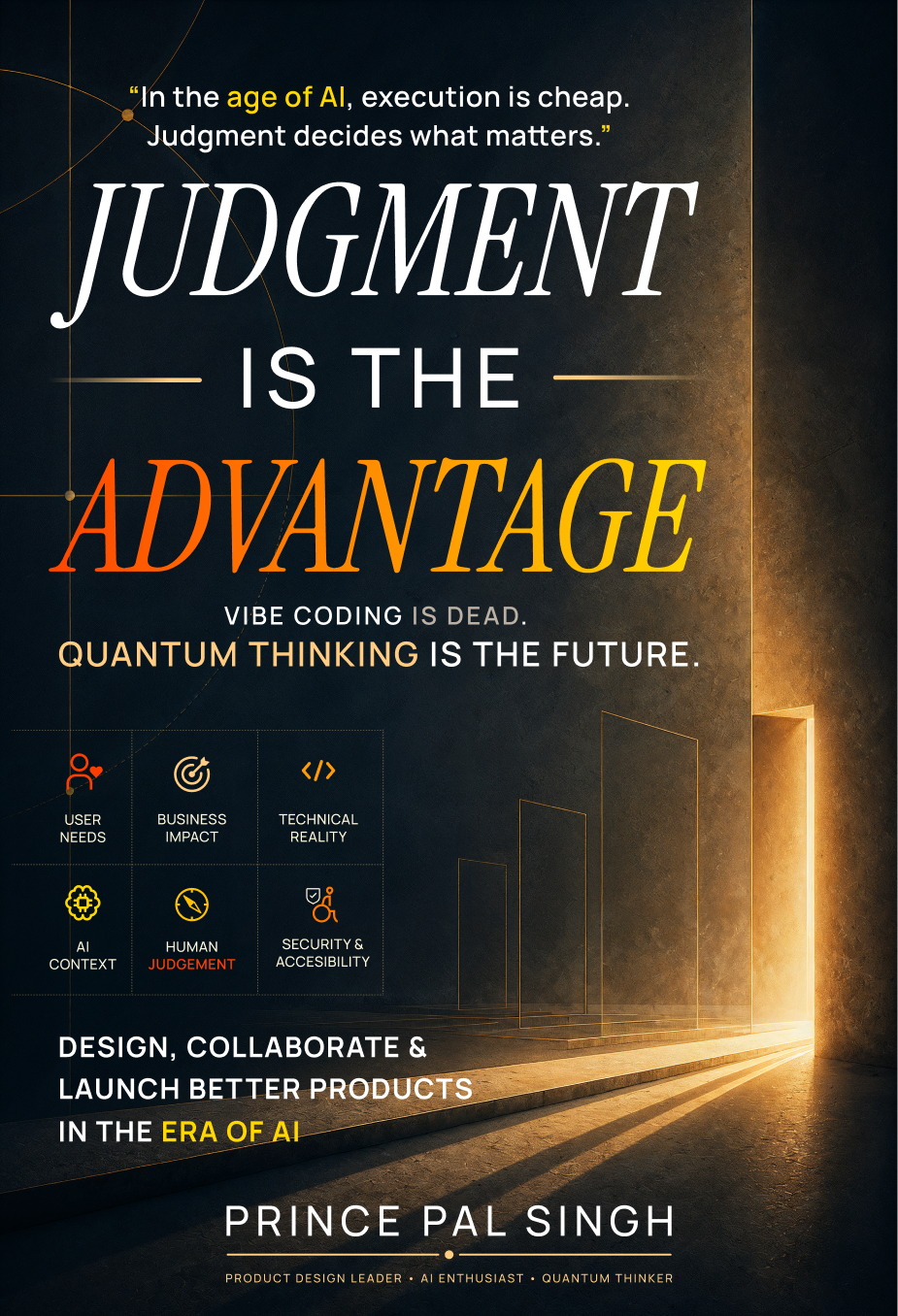
Prince Pal Singh
Judgment Is The Advantage book cover
Think 360 Studio

Thank you.

Ask me anything — collaboration, AI workflows, career growth, or a real product challenge you’re facing.

Prince PalUX Architect · Designer · Strategistprincepaluiux.com
Prince Pal